Use AI to improve the photography, not recreate the food
I’m not the only one who cringes a little when I see obviously fake food photos. I’ve been reading through restaurant discussions on Reddit, and apparently I’m not the only one.
For me, it isn’t even really about AI. It’s about trust.
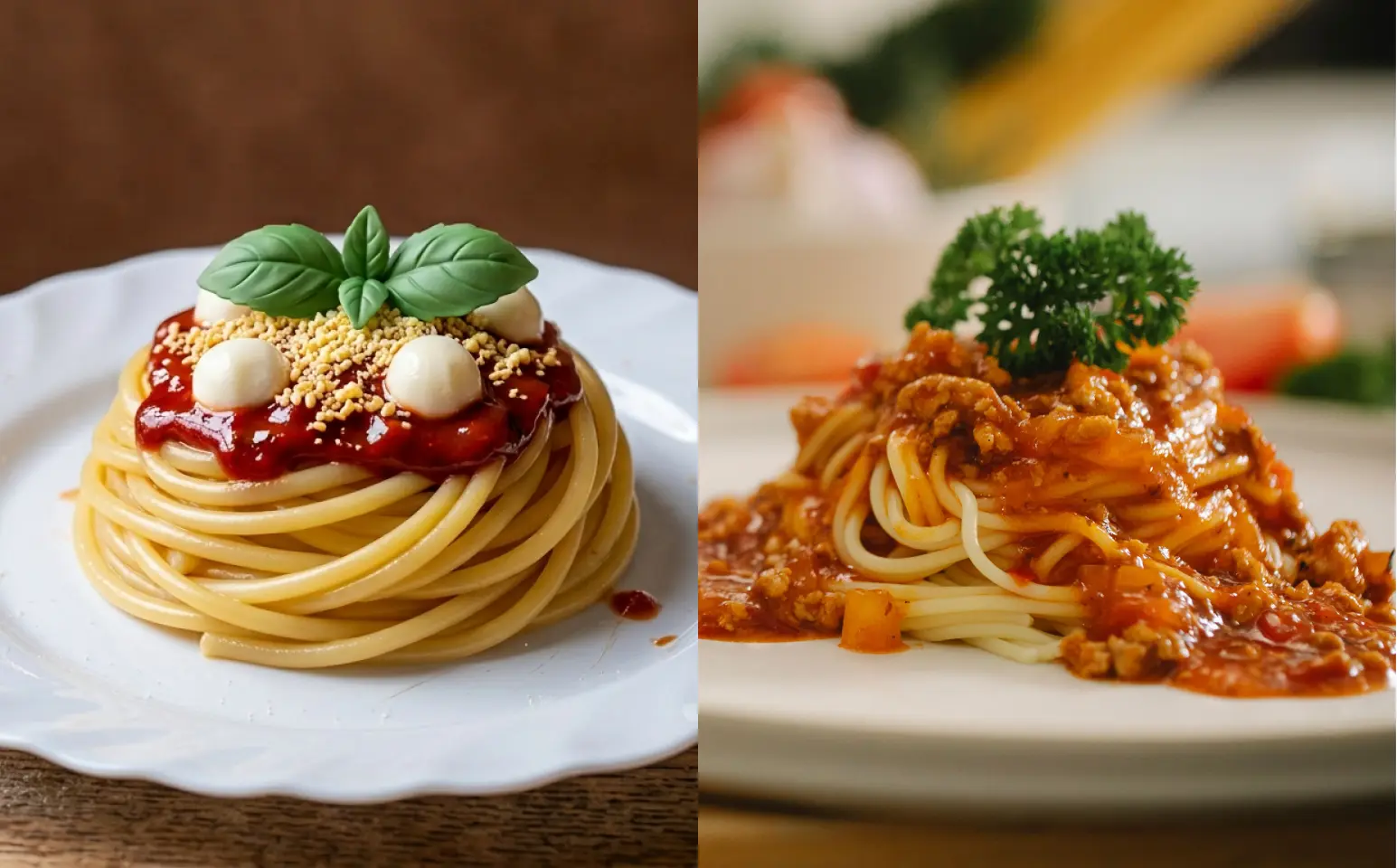
If I walk into a restaurant and the first thing I see is a giant, perfectly geometric pasta that looks almost cartoon-like, my first thought isn’t necessarily “that looks delicious.”
It’s more like: “Huh... what will I actually get?” 😕
And if the photo looks fake, I start wondering: what else isn’t quite what it seems?
Maybe that sounds harsh. But that’s the problem with food photography: the image sets an expectation. If the picture feels unrealistic, I’m already wondering whether the actual food will live up to it.
And that little bit of doubt — it’s not exactly what you want your customer to feel before they walk through the door.
Start with a real photo
You don’t need a professional camera to start. Any new smartphone can make really good photos nowadays. A clear photo can be enough if the food is in focus, reasonably well-lit, and clearly visible.
- Improve lighting
- Clean up the background
- Adjust colour and contrast
- Create a more consistent visual style
- Add subtle depth of field
- Prepare the image for your website or social media
But the actual dish should remain yours
If you sell a chicken sandwich with lettuce, tomato, and mayo, the AI shouldn’t decide that it would look better with avocado, crispy onions, and a mountain of cheese.
The prompt that keeps your food intact
This is the part you can actually copy and use. A general AI food photography prompt:
Copy-paste prompt
Use the provided photo as the exact reference for the food. Improve the photograph professionally while preserving the dish exactly as it appears in the original image. Do not change, add, remove, or invent any ingredients. Preserve the exact proportions, portion size, shape, colours, textures, toppings, plating, and arrangement. Do not redesign or restyle the food. Only improve the photographic presentation: natural professional lighting, realistic colour balance, subtle contrast, realistic texture, clean composition, and an appropriate background. The final image should look like a real photograph of the original dish, not an AI-generated recreation. Keep the food realistic, natural, and slightly imperfect. Avoid excessive gloss, unrealistic textures, oversized portions, or perfectly symmetrical food.
The important part isn’t that this is a “magic prompt.” It isn’t. The important part is that you’re giving the AI boundaries.
Change the background, not the food
Once you’ve protected the food, you can get much more creative with the environment.
Clean and minimal
Preserve the food exactly as shown in the reference image. Do not change the ingredients, plating, proportions, colours, or texture. Place the dish on a clean, neutral surface with soft natural lighting, realistic shadows, and a simple, professional restaurant setting.
Warm and cozy
Keep the dish exactly as photographed. Do not alter or add any ingredients. Place the food in a warm, inviting restaurant environment with natural daylight, subtle shadows, warm neutral tones, and realistic textures. Keep the food authentic and slightly imperfect.
Dark and moody
Preserve the exact dish from the reference photo. Do not change the ingredients, shape, portion, plating, or colours. Create a dark, sophisticated food photography environment with controlled directional lighting, natural shadows, and subtle contrast. Keep all food textures realistic and avoid excessive gloss.
Social media
Preserve the exact dish from the reference photo. Improve the composition for social media while keeping the food completely unchanged. Use natural, appetizing lighting, realistic texture, subtle depth of field, and a clean environment. The final image should feel professionally photographed, authentic, and believable.
You can change the environment depending on your restaurant’s personality.
A rustic café might work beautifully with warm wood. A modern restaurant might suit stone or a clean architectural background. A bakery might benefit from linen and soft daylight. The background should support your food — not become the main character.
What should AI never change?
This is where your prompt really matters. Before you generate anything, decide what is off-limits.
- Ingredients. Don’t let AI add things you don’t serve.
- Portion size. Don’t make your regular serving look twice as big.
- Plating. If your kitchen serves the dish in a particular bowl or plate, keep it.
- Texture. Food should look like food. Not plastic. Not wax. Not something from a video game.
- Colours. AI can make food unnaturally vibrant or saturated.
- Imperfections. Real food has variation. A little messiness can actually make a photo feel more believable.
This is especially important for restaurant menus.
Your customer isn’t ordering the photograph. They’re ordering what the photograph promises.
Signs your AI food photo has gone too far
Before you upload your new image to your website, menu, or delivery platform, zoom in. Look for:
- Extra ingredients. Did AI sneak in a garnish that isn’t actually on the dish?
- Impossible textures. Does the cheese look like plastic? Does the bread look strangely smooth?
- Unrealistic portions. Does the dish suddenly look much bigger than what customers receive?
- Perfect symmetry. Are all the ingredients suspiciously identical?
- A completely different restaurant vibe. Does your casual neighbourhood café suddenly look like a luxury restaurant?
Don’t just ask: “Does this look good?”
Ask: “Does this look like something my customer could actually order here?”
That’s the better test.
FAQ
Can I use AI to improve my restaurant food photos?
Yes. AI can be useful for improving lighting, backgrounds, colour, and composition. Start with a real photo and tell the AI exactly what must remain unchanged.
How do I stop AI from changing my food?
Be specific. Tell it to preserve the exact ingredients, portions, plating, colours, textures, and arrangement. Also avoid asking it to make too many changes at once.
What is the best AI prompt for food photography?
There isn’t one universal prompt. A good prompt clearly establishes the original photo as the source of truth and gives the AI permission to improve the photography without redesigning the food.
Can AI make a bad food photo look professional?
Sometimes. But if the original image is blurry, poorly lit, or doesn’t clearly show the dish, taking a better photo may give you a much better result than trying to fix everything with AI.
Real food deserves real photos — and a menu designed around them. I design print + digital menus for restaurants in Kelowna and the Okanagan. Get a quote →